The Call for Participation for Akademy is officially opened!
...and closes relatively shortly! Sunday the 12th of June 2022
You can find more information and summit your talk abstract here: https://akademy.kde.org/2022/cfp
If you have any questions or would like to speak to the organizers, please contact akademy-team@kde.org
Monday, May 23, 2022

Saturday, May 14, 2022
The KDE Qt5 Patch Collection has been rebased on top of Qt 5.15.4
Commit: https://invent.kde.org/qt/qt/qt5/-/commit/5c85338da3c272587c0ec804c7565db57729fd48
Commercial release announcement: https://www.qt.io/blog/commercial-lts-qt-5.15.4-released
I want to personally extend my gratitude to the Commercial users of Qt for beta testing Qt 5.15.4 for the rest of us.
The Commercial Qt 5.15.4 release introduced some bugs that have later been fixed. Thanks to that, our Patchset Collection has been able to incorporate the reverts for those two bugs that affected Android and Windows and the Free Software users will never be affected by those!
Friday, April 29, 2022
Poppler finally has support for embedding fonts in PDF files!
Why would you want to embed fonts in PDF files are you probably asking yourself?
Short answer: It fixes issues when adding text to the PDF files.
Long answer:
Poppler has had the feature of being able to fill in forms, create annotations and more recently add Digital Signatures to existing PDF files.
This works relatively well if you limit yourself to entering 'basic' ASCII characters, but once you go to more 'complex' characters, things don't really work, from the outside it seems like it should be relatively simple to fix, but things related to PDF are never as simple as they may seem.
In PDF each bit of text is associated with a Font object. That Font generally only supports one kind of text encoding and at most 'only' 65535 characters (65535 may seem a lot, but once you start taking into account non latin-based languages, you quickly 'run out' of characters).
What Poppler used to do in the past was just save the text in the PDF file and say "This text is written in Helvetica font", without even really care to specify much what 'Helvetica font' meant, and then let the PDF viewer (remember when we save the PDF file, it will not only be rendered by Poppler again, but potentially by Adobe Reader, Chrome, Firefox, etc.) try to figure out what to do with that information, which as said usually didn't go very well for the more 'complex' characters.
What we do now is for each character of new text that we add to the file is we make sure to embed a font for it. So if you're writing something like 'holaħŋ↓' we may end up adding a few fonts to the PDF file, and then instead of saying 'This is the text and it's in Helvetica, good luck', we will say something like 'This text is characters 4, 67, 83 and 98 of embedded Font X, characters 4 and 99 of embedded Font X2 and character 16574 of embedded Font X3'. This way when the file is opened by a PDF viewer it is 'very easy' for them to do the right thing and show what we wanted.
Enough of technical talk! Now some screenshots to show how this has been fixed for Text Annotations, Forms and Signatures :)
Writing "hello↓漢you" to a form
Before

Now

Signing a PDF file with my name being "Albeŋŧ As漢tals Ciđ"
Before

Now

Writing hola↓漢字 in a Text Annotation
Before

Now

Monday, March 07, 2022
Okular: Signature support now works on Android
This is a continuation of https://tsdgeos.blogspot.com/2022/02/okular-signature-verification-user.html
In that blog what was introduced was the new user interface to be able to see digital signatures in the mobile interface (i.e. the one that uses Kirigami instead of QWidgets).
You can use the Okular mobile interface anywhere you want, it's not really mobile-only, it's really mobile-optimized, so you can try it (though you'll have to build it manually since most distributions don't build it by default) on desktop Linux too.
Anyway, in that previous blog I talked about introducing the new user interface to be able to see digital signatures, and that worked out of the box in places that provide NSS like desktop Linux or Plasma Phone distributions (Aleix tried on the PinePhone and confirmed it works), but for Android it still did not work.
What was needed was something very similar to what we did for Windows https://tsdgeos.blogspot.com/2022/02/okular-signature-support-now-works-on.html but this time for Android.
I added a way for Craft to build NSS for Android and told it to not disable NSS when building poppler for Android that should have been all.
But things are never simple enough...
For Android we use a tool called androiddeployqt, it is a tool that gathers everything needed for your project and creates the APK file for it. Unfortunately it has a documented limitation with runtime plugins, it has no way to know they are needed so they are not packaged. NSS unfortunately has plugins, so after some "why is this crashing?" hours of scratching my head and debugging i realized the problem was the missing plugins were not being "installed".
The workaround to make androiddeployqt work for plugins is basically linking the plugins to your binary, this way the plugin is a clear dependency and gets packaged, but did I say things are never simple enough?
In KDE we have binary-factory continuous integration for Android and we also have gitlab continuous integration for Android, unfortunately they use different ways of building, the first uses Craft, the second does not. This means that in gitlab CI the NSS library is not available, so I can't link to it, but i need to link to it so that Craft on the binary-factory CI creates the APK files correctly.
To try to resolve that I came up with a patch that tried to differentiate if we were building inside Craft or the gitlab CI unfortunately while that worked on my local setup it did not work on the KDE servers, so at the end I resolved for a much more pedestrian way, there's an option to enable the extra libraries and Craft enables that option when building Okular
So after that, yes, it works as you can see in the screenshot below :)
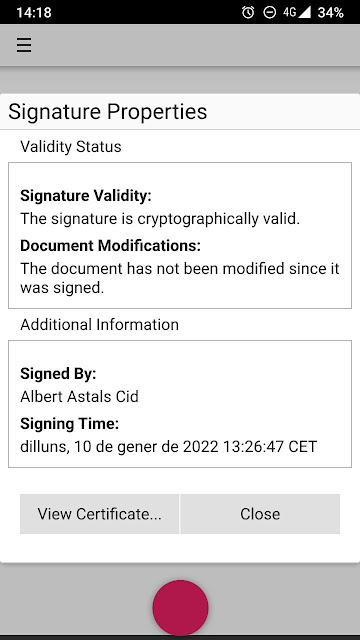 |
| Signature Properties User Interface |
If you want you can download the Okular APK from https://binary-factory.kde.org/job/Okular_Nightly_android-arm64/ but beware there are still some limitations that don't make Okular usable day-to-day for Android, so we've created a Google Summer of Code potential project for that, maybe you're interested?
Sunday, March 06, 2022
Looking for Translators!
KDE produces amazing software, but sometimes not everyone can use it.
One of the reasons that can happen is because it's not translated to a language they understand.
For that we are calling for translators, specially for the languages listed below which had not had a single translation update in the last year [*].
Committing to help means that you will do some work every now and then, not just translate a few texts only.
We will help you learn the tools needed and hopefully if you know more people that can help you can grow a team :)
If you're interested please email me at aacid@kde.org
Afrikaans
Armenian
Assamese
Bengali
Bosnian
Breton
Chhattisgarhi
Crimean Tatar
Croatian
Esperanto
Farsi
Frisian
Galician
Georgian
Gujarati
Hausa
Hebrew
Irish Gaelic
Kabyle
Kannada
Kashubian
Kazakh
Khmer
Kinyarwanda
Kurdish
Low Saxon
Luxembourgish
Macedonian
Maithili
Malay
Maltese
Marathi
Nepali
Northern Sotho
Occitan
Oriya
Pashto
Scottish Gaelic
Sinhala
Tatar
Telugu
Thai
Tswana
Uyghur
Uzbek
Walloon
Welsh
Xhosa
[*] apologies if indeed there were translations and my script failed for some reason
Friday, February 18, 2022
Okular: Signature verification User Interface added to Okular mobile interface
Okular has two user interfaces, you can control which one you get when compiling okular by setting the OKULAR_UI cmake variable to desktop (the default) or to mobile (which you can build just fine on the desktop too, there's nothing "mobile only" in it).
The mobile one is built on top of Kirigami and is more oriented to use with touch screens. It also has fewer features, for example, you can't add annotations nor fill forms. I could say it's less likely you need those features on a mobile form factor but that's less and less true as time goes and computing shifts to mobile devices, but that's a story for another day.
One of the features that was missing until today is the user interface parts related to Digital Signature verification, that is, those parts that say if a PDF is signed, if the signature is valid, let you see the certificate, etc.
Now the same as with the desktop version, you get
the "This document is signed" (and it's variations) banner

The Signature tree on the sidebar/drawer

The Signature properties dialog

And the Certificate properties dialog

The last two are not super great looking but there's not much more you can do when you have to dump lots of data to the user.
Friday, February 04, 2022
Okular: Signature support now works on Windows
Since a few hours ago the Okular version available in the Microsoft Store for Windows has the same signature support than the Linux/FreeBSD versions.
Some screenshots, though it's nothing impressive, it's the same User Interface that we already have had for a while
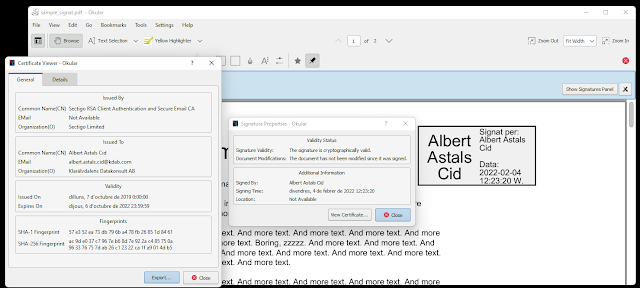 |
| A file I just signed, showing the Signature and Certificate panels |
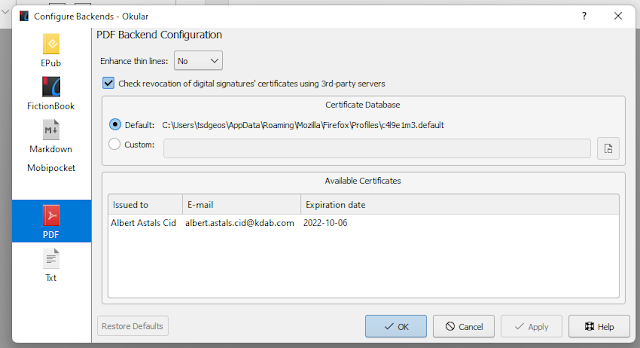 |
| The PDF backend settings |
This "new feature" has been delivered with the update of the just released Okular 21.12.2.
The interesting part is that adding Signature support for Okular on Windows didn't actually require *any* change in Okular itself, its code was already good.
What we needed was to add NSS [1] to Craft [2] and also some tweaks to poppler [3], because sadly NSS doesn't behave exactly the same on Linux than on Windows, and once that was in, just start Okular again and voilà everything was working as expected :)
Relevant Merge Requests:
https://invent.kde.org/packaging/craft-blueprints-kde/-/merge_requests/301
https://invent.kde.org/packaging/craft-blueprints-kde/-/merge_requests/304
https://invent.kde.org/packaging/craft-blueprints-kde/-/merge_requests/305
https://gitlab.freedesktop.org/poppler/poppler/-/merge_requests/1038
https://gitlab.freedesktop.org/poppler/poppler/-/merge_requests/1042
https://gitlab.freedesktop.org/poppler/poppler/-/merge_requests/1044
https://gitlab.freedesktop.org/poppler/poppler/-/merge_requests/1056
https://gitlab.freedesktop.org/poppler/poppler/-/merge_requests/1057
https://gitlab.freedesktop.org/poppler/poppler/-/merge_requests/1059
[1] NSS = the library poppler uses for signature support
[2] Craft = the meta build system we use for building KDE software on Windows
[3] poppler = the library that Okular uses for PDF support
Thursday, January 27, 2022
KDE Gear 22.04 release schedule finalized
It is available at the usual place https://community.kde.org/Schedules/KDE_Gear_22.04_Schedule
Dependency freeze is in six weeks (March 10) and Feature Freeze a week after that, make sure you start finishing your stuff!
Monday, January 24, 2022
Okular: Signing of unsigned signature fields has landed
Up to today, Okular would kind of error out when opening a PDF file that contains a signature field that was unsigned (think like the old space in paper forms saying "sign here")
It would tell you "document is signed but can't be properly validated"

And that was it, you couldn't do much with the signature. When you tried to "see" it all the fields would be default like "Signed at 1 Jan 1970", etc.
With the new code we properly detect that there are unsigned signatures and we offer to sign them when interacting with it

Relevant merge requests:
https://invent.kde.org/graphics/okular/-/merge_requests/539
https://gitlab.freedesktop.org/poppler/poppler/-/merge_requests/1026
Wednesday, December 01, 2021
Okular PDF digital signature improvements coming "soon" thanks to NLnet
Starting on January I will be working on a project named "Improve Okular digital signature support" that has received a grant from the NLnet foundation as part of the NGI Assure fund.
This will allow me to work part time on Okular (in case it's not clear I work on Okular on a "when I have time-hobby" basis right now), the planned improvements are:
1. Support for signing unsigned signatures. I know it sounds confusing, think about it like something like the old "sign here" boxes on printed paper forms.
2. Support digital signatures in the Okular Windows version
3. Make signature text support all character sets
4. Write Okular-mobile user interface to show signature status
5. Support digital signatures in the Okular Android version
But I'm hoping to squeeze some other signature related improvements in, if you have a particular favourite please leave a comment.
Thanks to NLnet for trusting me on this, and also thanks to my current employer (KDAB) for allowing me to work less hours for a few months so I can take on this project.
Monday, November 08, 2021
KDE Gear 21.12 releases branches created
Please make sure you commit anything you want to end up in the 21.12
releases to them.
We're already past the dependency freeze, so no new dependencies or
increasing of dependency versions in the stable branches.
The feature freeze, tagging and release of the beta (21.11.80) is in four
days,11 November.
Next interesting dates:
November 25: 21.12 RC (21.11.90) Tagging and Release
December 2: 21.12 Tagging
December 9: 21.12 Release
Complete Schedule:
https://community.kde.org/Schedules/KDE_Gear_21.12_Schedule
Thursday, October 07, 2021
KDE Gear 21.12 releases schedule finalized
It is available at the usual place https://community.kde.org/Schedules/KDE_Gear_21.12_Schedule
Dependency freeze is in four weeks (November 4) and Feature Freeze a week after that, make sure you start finishing your stuff!
Saturday, September 18, 2021
PSA: Don't insult or physically threaten people to try to convince them you are right
Sadly I have had to disable comments in my previous blog because there is a being [that probably passes by human if you look at them] that started with insults, continued with more insults and then graduated to physically threaten me.
I always thought it was obvious, but if you insult people or try to cause them phisical harm, they are usually less prone to think "oh you're right, you've convinced me" and more prone to think "this human needs to stop harassing me and sort out their problems".
Friday, September 17, 2021
American English speakers: Kiev or Kyiv ?
A while ago there was a merge request created for KGeography asking to change Kiev to Kyiv saying "this is the official transliteration of the name for the city".
But that's not what the default text in KGeography shows, the default text in KGeography not the official names of places, the default text in KGeography is the American English translation of KGeography, that's why it says Poland and not Polska.
So question for you American English speakers, if you wanted to write the name of the capital of Ukraine, would you write Kiev or Kyiv?
Edit: comments blocked because there's an body without brain that can't behave in the internet.
Friday, August 27, 2021
Poppler 21.09 will have a massive speed increase for PDF files that use lots of save/restore PDF commands
Take the file from poppler issue 1126. It's a file that doesn't look super complicated, a map of some caves.
With Poppler 21.08 it took 46 seconds to render in my relatively powerful i9-8950HK
Thanks to a patch from Thomas Freitag that time got reduced to 28 seconds by not recalculating again something we had already calculated and just copying it. Huge improvement! [This patch was developed prior to the filing of issue 1126, i guess Thomas had found similar issues on his own]
Then issue 1126 was created yesterday and it was clear that we were still super slow, mupdf/gs/firefox/chromium can render the file almost instantly, and we were at 28 seconds :/
So i had a look at the code and thought, why are we even copying the data if that data never changes? So I made a patch that brought rendering time down to 2.8 seconds :)
And then i had another look at the code and realized we were copying some more data that was never even used
After patching that we're standing at 1.5 seconds
The 3 combined patches have reduced the rendering time by more than 95%
P.S: This only applies to the Splash backend (used by Okular), the Cairo backend (used by Evince) is at 120 seconds, so someone should have a look because probably similar improvements can be made.
Saturday, July 10, 2021
KDE Gear 21.08 releases branches created
Make sure you commit anything you want to end up in the 21.08 releases to them
We're already past the dependency freeze.
The Feature Freeze and Beta is this Thursday 15 of July.
More interesting dates:
https://community.kde.org/Schedules/release_service/21.08_Release_Schedule
We're already past the dependency freeze.
The Feature Freeze and Beta is this Thursday 15 of July.
More interesting dates:
- July 29: 21.08 RC (21.07.90) Tagging and Release
- August 5: 21.08 Tagging
- August 12: 21.08 Release
https://community.kde.org/Schedules/release_service/21.08_Release_Schedule
Monday, June 28, 2021
Everything we release in KDE Gear is maintained
During Akademy some members of the community said stuff like "app/library XXX and YYY are not maintained even if we ship them in KDE Gear".
Which is not true, everything released in KDE Gear is maintained, there may not be an explicit maintainer, but there is shared community maintenance.
When confronting a particular person about it, they said "but look, there has not been any new commit that isn't either translation improvements or adapting to code deprecations/etc.", to which i said, "yes, that is exactly what maintenance means".
Road maintenance doesn't mean adding more lanes to the road every month, just means making sure the road does not break and fixing it a bit when/if it happens.
The same applies to software maintenance, the fact that there are no new features does not mean the software is not maintained.
Now, it is true that with community maintenance it's possible that the greater we has missed that something has stopped working, in that case, please raise it up, and we'll evaluate whether it's fixable or if indeed we want to declare that particular bit of software as unmaintained and stop shipping it in KDE Gear.
Wednesday, June 09, 2021
KDE Gear 21.08 releases schedule finalized
It is available at the usual place https://community.kde.org/Schedules/KDE_Gear_21.08_Schedule
Dependency freeze is in four weeks (July 8) and Feature Freeze a week after that, make sure you start finishing your stuff!
Monday, May 31, 2021
How i ended up fixing a "not a bug" in Qt Quick that made apostrophes not being rendered while reviewing an Okular patch
But in Okular we don't use Qt Quick you'll say!
Well, we actually use Qt Quick in the mobile interface of Okular, but you're right, this was not a patch for the mobile version, so "But in Okular we don't use Qt Quick!"
The story goes like this.
I was reviewing https://invent.kde.org/graphics/okular/-/merge_requests/431 and was not super convinced of the look and feel of it, so Nate gave some examples and one example was "the sidebar in Elisa".
So I started Elisa and saw this

You probably don't speak Catalan so don't see that lesquerra is a mistake it should be l'esquerra.
Oh the translators made a mistake i thought, so i went to the .po file https://websvn.kde.org/trunk/l10n-kf5/ca/messages/elisa/elisa.po?view=markup#l638 and oh surprise! the translators had not made a mistake (well not really a surprise since they're really good).
Ok, so what's wrong then?
I had a look at the .qml code https://invent.kde.org/multimedia/elisa/-/blob/release/21.04/src/qml/MediaPlayListView.qml#L333 and it really looked simple enough.
I had never seen a Kirigami.PlaceholderMessage before but looking at it, well the text ended up in a Kirigami.Heading and then in a QtQuick Label. Nothing really special.
Weeeeeeird.
Ok i said, let's replace the the whole xi18nc in there with the translated text and run elisa. And then i could see the ' properly.
Hmmmm, ok then the problem had to be xi18nc right? Well it was and it was not.
The problem is that xi18nc translates ' to ' to be more "html compliant" https://invent.kde.org/frameworks/ki18n/-/blob/master/src/kuitmarkup.cpp#L40
And unfortunately Qt Declarative 5.15 Text item default "html support" is something Qt calls "Styled Text" that only supports five HTML entities, and apos is not one of them https://code.qt.io/cgit/qt/qtdeclarative.git/tree/src/quick/util/qquickstyledtext.cpp?h=5.15.2#n558
So where is the bug?
The Text documentation clearly states that ' is in the list of supported entities.
One could say the bug is that every time we use xi18nc in a Text we should remember to change the "html support" to something Qt calls "RichText" that actually supports '.
But we all know that's never going to happen :D, and in this case it would actually be hard since Kirigami.PlaceholderMessage doesn't even expose the format property of the inner text
So I convinced our friends at Qt that only supporting five entities is not great and now we support six ^_^ in Qt 6.2, 6.1 and 5.15 (if you use the KDE Qt patch collection) https://invent.kde.org/qt/qt/qtdeclarative/-/merge_requests/3/diffs
P.S: I have a patch in the works to support all HTML entities in StyledText but somehow it's breaking the tests, so well, need to work more on it :)
Subscribe to:
Posts (Atom)