Showing posts with label okular. Show all posts

Monday, September 21, 2026

Help testing future Okular (if you use PDF files with embedded Audio or Video)

We just merged a code change in Okular master to use QtMultimedia instead of Phonon to play multimedia files.


This will be released in December. 


We did as much testing as we could but given the complexity of this feature it would be nice if users could test it as much as possible.


If you have PDF files with video or audio files it would be great if you could install this flatpak file https://invent.kde.org/graphics/okular/-/jobs/5052739/artifacts/raw/okular.flatpak (may be out of date in a few days, write a comment if you want to test and the file is no longer available).


You can install it with  flatpak --user install once downloaded (it should not conflict with neither your distribution installed Okular nor if you have a stable Okular flatpak installed) 

Then you can run it with  flatpak run --branch=master org.kde.okular


Once you do that do as much testing as you can with PDF files with embedded audio/video. If you find bugs (specially if they are regressions against the current version) please report the issues in bugs.kde.org 

Friday, April 29, 2022

Poppler finally has support for embedding fonts in PDF files!

 Why would you want to embed fonts in PDF files are you probably asking yourself?

Short answer: It fixes issues when adding text to the PDF files.

Long answer:

Poppler has had the feature of being able to fill in forms, create annotations and more recently add Digital Signatures to existing PDF files.

This works relatively well if you limit yourself to entering 'basic' ASCII characters, but once you go to more 'complex' characters, things don't really work, from the outside it seems like it should be relatively simple to fix, but things related to PDF are never as simple as they may seem.

In PDF each bit of text is associated with a Font object. That Font generally only supports one kind of text encoding and at most 'only' 65535 characters (65535 may seem a lot, but once you start taking into account non latin-based languages, you quickly 'run out' of characters).

What Poppler used to do in the past was just save the text in the PDF file and say "This text is written in Helvetica font", without even really care to specify much what 'Helvetica font' meant,  and then let the PDF viewer (remember when we save the PDF file, it will not only be rendered by Poppler again, but potentially by Adobe Reader, Chrome, Firefox, etc.) try to figure out what to do with that information, which as said usually didn't go very well for the more 'complex' characters.

What we do now is for each character of new text that we add to the file is we make sure to embed a font for it. So if you're writing something like 'holaħŋ↓' we may end up adding a few fonts to the PDF file, and then instead of saying 'This is the text and it's in Helvetica, good luck', we will say something like 'This text is characters 4, 67, 83 and 98 of embedded Font X, characters 4 and 99 of embedded Font X2 and character 16574 of embedded Font X3'. This way when the file is opened by a PDF viewer it is 'very easy' for them to do the right thing and show what we wanted.

Enough of technical talk! Now some screenshots to show how this has been fixed for Text Annotations, Forms and Signatures :)

Writing "hello↓漢you" to a form

Before

imatge 

Now

 imatge 

Signing a PDF file with my name being "Albeŋŧ As漢tals Ciđ"

Before

image 

Now

image 


Writing hola↓漢字 in a Text Annotation

Before


 Now

Friday, February 04, 2022

Okular: Signature support now works on Windows

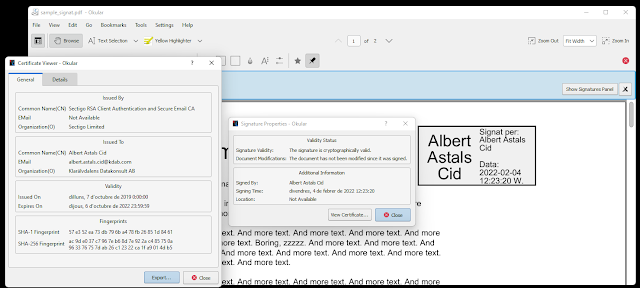
Since a few hours ago the Okular version available in the Microsoft Store for Windows has the same signature support than the Linux/FreeBSD versions.


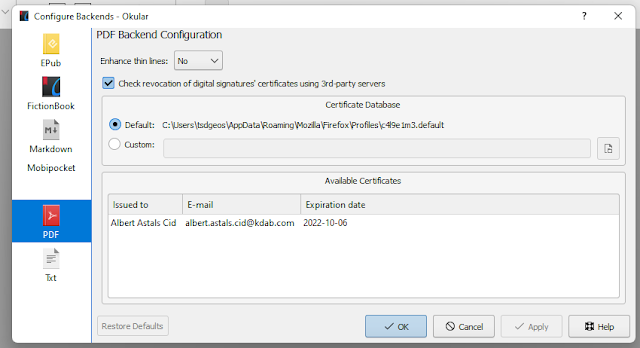
Some screenshots, though it's nothing impressive, it's the same User Interface that we already have had for a while


A file I just signed, showing the Signature and Certificate panels


The PDF backend settings


This "new feature" has been delivered with the update of the just released Okular 21.12.2.

The interesting part is that adding Signature support for Okular on Windows didn't actually require *any* change in Okular itself, its code was already good.


What we needed was to add NSS [1] to Craft [2] and also some tweaks to poppler [3], because sadly NSS doesn't behave exactly the same on Linux than on Windows, and once that was in, just start Okular again and voilà everything was working as expected :)


Relevant Merge Requests:

https://invent.kde.org/packaging/craft-blueprints-kde/-/merge_requests/301

https://invent.kde.org/packaging/craft-blueprints-kde/-/merge_requests/304

https://invent.kde.org/packaging/craft-blueprints-kde/-/merge_requests/305

https://gitlab.freedesktop.org/poppler/poppler/-/merge_requests/1038

https://gitlab.freedesktop.org/poppler/poppler/-/merge_requests/1042

https://gitlab.freedesktop.org/poppler/poppler/-/merge_requests/1044

https://gitlab.freedesktop.org/poppler/poppler/-/merge_requests/1056

https://gitlab.freedesktop.org/poppler/poppler/-/merge_requests/1057

https://gitlab.freedesktop.org/poppler/poppler/-/merge_requests/1059


[1] NSS = the library poppler uses for signature support

[2] Craft = the meta build system we use for building KDE software on Windows

[3] poppler = the library that Okular uses for PDF support

Monday, January 24, 2022

Okular: Signing of unsigned signature fields has landed

Up to today, Okular would kind of error out when opening a PDF file that contains a signature field that was unsigned (think like the old space in paper forms saying "sign here")


It would tell you "document is signed but can't be properly validated"


And that was it, you couldn't do much with the signature. When you tried to "see" it all the fields would be default like "Signed at 1 Jan 1970", etc.


With the new code we properly detect that there are unsigned signatures and we offer to sign them when interacting with it


Relevant merge requests:

https://invent.kde.org/graphics/okular/-/merge_requests/539

https://gitlab.freedesktop.org/poppler/poppler/-/merge_requests/1026

Monday, May 31, 2021

How i ended up fixing a "not a bug" in Qt Quick that made apostrophes not being rendered while reviewing an Okular patch

But in Okular we don't use Qt Quick you'll say!


Well, we actually use Qt Quick in the mobile interface of Okular, but you're right, this was not a patch for the mobile version, so "But in Okular we don't use Qt Quick!"


The story goes like this.

I was reviewing https://invent.kde.org/graphics/okular/-/merge_requests/431 and was not super convinced of the look and feel of it, so Nate gave some examples and one example was "the sidebar in Elisa".


So I started Elisa and saw this

You probably don't speak Catalan so don't see that lesquerra is a mistake it should be l'esquerra. 


Oh the translators made a mistake i thought, so i went to the .po file https://websvn.kde.org/trunk/l10n-kf5/ca/messages/elisa/elisa.po?view=markup#l638 and oh surprise! the translators had not made a mistake (well not really a surprise since they're really good).


Ok, so what's wrong then?


I had a look at the .qml code https://invent.kde.org/multimedia/elisa/-/blob/release/21.04/src/qml/MediaPlayListView.qml#L333 and it really looked simple enough.


I had never seen a Kirigami.PlaceholderMessage before but looking at it, well the text ended up in a Kirigami.Heading and then in a QtQuick Label. Nothing really special.


Weeeeeeird.


Ok i said, let's replace the the whole xi18nc in there with the translated text and run elisa. And then i could see the ' properly.


Hmmmm, ok then the problem had to be xi18nc right? Well it was and it was not.


The problem is that xi18nc translates ' to ' to be more "html compliant" https://invent.kde.org/frameworks/ki18n/-/blob/master/src/kuitmarkup.cpp#L40


And unfortunately Qt Declarative 5.15 Text item default "html support" is something Qt calls "Styled Text" that only supports five HTML entities, and apos is not one of them https://code.qt.io/cgit/qt/qtdeclarative.git/tree/src/quick/util/qquickstyledtext.cpp?h=5.15.2#n558


So where is the bug?


The Text documentation clearly states that ' is in the list of supported entities.

One could say the bug is that every time we use xi18nc in a Text we should remember to change the "html support" to something Qt calls "RichText" that actually supports '.


But we all know that's never going to happen :D, and in this case it would actually be hard since Kirigami.PlaceholderMessage doesn't even expose the format property of the inner text

So I convinced our friends at Qt that only supporting five entities is not great and now we support six ^_^ in Qt 6.2, 6.1 and 5.15 (if you use the KDE Qt patch collection) https://invent.kde.org/qt/qt/qtdeclarative/-/merge_requests/3/diffs


P.S: I have a patch in the works to support all HTML entities in StyledText but somehow it's breaking the tests, so well, need to work more on it :)

Wednesday, February 24, 2021

Okular: Should continuous view be an okular setting or a document setting?

In Okular:


Some settings are okular wide, if you change them, they will be changed in all the future okular instances, an easy example is if you change the shortcut for saving from Ctrl+S to Ctrl+Shift+E. 


Some other settings are document specific, for example zoom, if you change the zoom of a document it will only be restored when opening the same document again, but not if you open a different one. There's also a "default zoom value for documents you've never opened before" in the settings.


Some other settings like "Continuous View" are a bit of a mess and are both. "Continuous View" wants to be a global setting (i.e. so that if you hate continuous view you always get a non continous view) but it is also restored to the status it had when you closed the document you're just opening.


That's understandably a bit confusing for users :D


My suggestion for continuous view would be to make it work like Zoom, be purely document specific but also have a default option in the settings dialog for people that hate continous view.


I'm guessing this should cover all our bases?


Opinions? Anything i may have missed?

Monday, October 05, 2020

Is okular-devel mailing list the correct way to reach the Okular developers? If not what do we use?

After my recent failure of gaining traction to get people to join a potential Okular Virtual Sprint i wondered, is the okular-devel mailing list representative of the current okular contributors?


Looking at the sheer number of subscribers one would think that probably. There's currently 128 people subscribed to the okular-devel mailing list, and we definitely don't have that many contributors, so it would seem the mailing list is a good place to reach all the contributors, but let's look at the actual numbers.


Okular git repo has had 46 people contributing code[*] in the last year.


Only 17% of those are subscribed to the okular-devel mailing list.


If we count commits instead of commiters, the number raises to 65% but that's just because I account for more than 50% of the commits, if you remove myself from the equation the number drops to 28%.


If we don't count people that only commited once (thinking that they may not be really interested in the project), the number is still at only 25% of commiters and 30% of commits (ignoring me again) subscribed to the mailing list.


So it would seem that the answer is leaning towards "no, i can't use okular-devel to contact the okular developers".


But if not the mailing list? What am i supposed to use? I don't see any other method that would be better.


Suggestions welcome!


[*] Yes I'm limiting contributors to git commiters at this point, it's the only thing i can easily count, i understand there's more contributions than code contributions

Monday, May 25, 2020

chmk a simple CHM viewer

Okular can view CHM files, to do so it uses KHTML, makes sense CHM is basically HTML with images all compressed into a single file.

This is somewhat problematic since KHTML is largely unmaintained and i doubt it'll get a Qt6 port.

The problem is that the only other Qt based HTML rendering engine is QtWebEngine and while great it doesn't support stuff we would need to use it in Okular, since Okular needs to access to the rendered image of the page and also to the text since it uses the same API for all formats, be it CHM, PDF, epub, wathever.

The easiest plan to move forward is probably drop CHM from Okular, but that means no more chm viewing in KDE software, which would be a bit sad.

So I thought, ok maybe I can do a quick CHM viewer just based in QtWebEngine without trying to fit it into the Okular backend to support different formats.

And ChmK was born https://invent.kde.org/aacid/chmk.

It's still very simple, but the basics work, if you give it a file in the command line, it'll open it and you'll be able to browse it.


As you can see it doesn't have *any* UI yet, so Merge Requests more than welcome.

Friday, April 17, 2020

Should KDE fork CHMLib?

CHMLib is a library to handle CHM files.

It is used by Okular and other applications to show those files.

It hasn't had a release in 11 years.

It is packaged by all major distributions.

A few weeks ago I got annoyed because we need to carry a patch in Okular flathub because the code is not great and it defines it's own int types.

I tried contacting the upstream author, but unsurprisingly after 11 years he doesn't seem to care much and got no answer.

Then i looked saw that various distributions carry different random set of patches, not great.

So I said, OK, maybe we should just fork it, and emailed 14 people listed at repology as package maintainers for CHMLib saying how they would react to KDE forking CHMLib in an effort to do some basic maintenance, i.e. get it to compile without need for patches, make sure all the patches different distributions has are in the same place, etc.

1 packager answered saying "great"
1 packager answered "nah we want to follow upstream" (... which part of upstream is dead did they not understand?)
1 person answered saying "i haven't been packaging for $DISTRO for ages" (makes sense given how old the package is)
1 person answered saying "not a maintainer anymore but i think you should not break API/ABI of CHMLib" (which makes sense, never said that was planned)

And that's it, so only 4 out of 14 answers and only one of them encouraging.

So I'm asking *YOU*, should we push for a fork or I should stop this crazyness and do something more productive?

Friday, January 11, 2019

Okular: PDF Signature + Certificate support has landed

As of a few minutes ago, i merged the code from Chinmoy Ranjan Pradhan's GSOC to support showing PDF Signatures and Certificates in Okular.


Signature handling is a big step for us, but it's also very complex, so i expect it to have bugs and things that can be improved so testers more than welcome.

Compiling is a bit "hard" since it requires poppler 0.73 that was released a few days ago.

But thanks to flatpak, there's no need to compile it, you can run the KDE Okular Nightly on your system to try it

flatpak remote-add --if-not-exists flathub https://flathub.org/repo/flathub.flatpakrepo
flatpak remote-add --if-not-exists kdeapps --from https://distribute.kde.org/kdeapps.flatpakrepo
flatpak install kdeapps org.kde.okular

Note: if you have okular installed from another flatpak repo (for example flathub) this will switch you to the KDE Nightlies, you may want to switch back after testing.

And then you can try the adobe sample pdf
flatpak run --share=network org.kde.okular https://blogs.adobe.com/security/SampleSignedPDFDocument.pdf

And you should get stuff like this

Friday, February 23, 2018

Okular gains some more JavaScript support

Andre Heinecke did some patches [1][2][3][4][5] over the last few weeks that finally got landed this week.

With it we support recalculation of some fields based on others. An example that calculates sum, average, product, minimum and maximum of three numbers can be found in this youtube video.


This code will be available for the Okular version that will ship with KDE Applications 18.04

Thursday, April 20, 2017

Okular 1.1 released!

Today KDE Applications 17.04 was released.

It includes Okular 1.1, it contains a nice set of features:
* Add annotation resize functionality
* Add support for auto-calculation of form contents via JavaScript
* Allow to rotate the page view using two-finger pinches on a touchscreen
* Change pages in presentation mode by swiping on touch screen
* Added support for Links that change the Optional Content visibility status
* Allow to disable automatic search while typing
* Allow to create bookmarks from the Table Of Contents

This release was brought to you by Albert Astals Cid, Oliver Sander, Luigi Toscano, Martin T. H. Sandsmark, Tobias Deiminger, Antonio Rojas, Burkhard Lück, Christoph Feck, Elvis Angelaccio, Gilbert Assaf, Heiko Becker, Hrvoje Senjan, Marco Scarpetta, Miklós Máté, Pino Toscano, Yuri Chornoivan.

Tuesday, March 07, 2017

Okular table selection mode is amazing

I case you didn't know ;)


Okular has a amazing table select mode where you select an area and Okular will auto detect rows and columns on it (you can fine-tune it afterwards) and then you can directly copy&paste to a spreadsheet :)

It's mostly tested on PDF files, but should work the same on any of the formats we support text extraction.

Update: This feature is not new, just i got to use it today ;) Video at https://www.youtube.com/watch?v=E8XWI06tltY