Monday, March 07, 2022

Okular: Signature support now works on Android

This is a continuation of https://tsdgeos.blogspot.com/2022/02/okular-signature-verification-user.html

In that blog what was introduced was the new user interface to be able to see digital signatures in the mobile interface (i.e. the one that uses Kirigami instead of QWidgets).

You can use the Okular mobile interface anywhere you want, it's not really mobile-only, it's really mobile-optimized, so you can try it (though you'll have to build it manually since most distributions don't build it by default) on desktop Linux too.

Anyway, in that previous blog I talked about introducing the new user interface to be able to see digital signatures, and that worked out of the box in places that provide NSS like desktop Linux or Plasma Phone distributions (Aleix tried on the PinePhone and confirmed it works), but for Android it still did not work.

What was needed was something very similar to what we did for Windows https://tsdgeos.blogspot.com/2022/02/okular-signature-support-now-works-on.html but this time for Android.

I added a way for Craft to build NSS for Android and told it to not disable NSS when building poppler for Android that should have been all.

But things are never simple enough...

For Android we use a tool called androiddeployqt, it is a tool that gathers everything needed for your project and creates the APK file for it. Unfortunately it has a documented limitation with runtime plugins, it has no way to know they are needed so they are not packaged. NSS unfortunately has plugins, so after some "why is this crashing?" hours of scratching my head and debugging i realized the problem was the missing plugins were not being "installed".

The workaround to make androiddeployqt work for plugins is basically linking the plugins to your binary, this way the plugin is a clear dependency and gets packaged, but did I say things are never simple enough?

In KDE we have binary-factory continuous integration for Android and we also have gitlab continuous integration for Android, unfortunately they use different ways of building, the first uses Craft, the second does not. This means that in gitlab CI the NSS library is not available, so I can't link to it, but i need to link to it so that Craft on the binary-factory CI creates the APK files correctly.

To try to resolve that I came up with a patch that tried to differentiate if we were building inside Craft or the gitlab CI unfortunately while that worked on my local setup it did not work on the KDE servers, so at the end I resolved for a much more pedestrian way, there's an option to enable the extra libraries and Craft enables that option when building Okular

So after that, yes, it works as you can see in the screenshot below :)
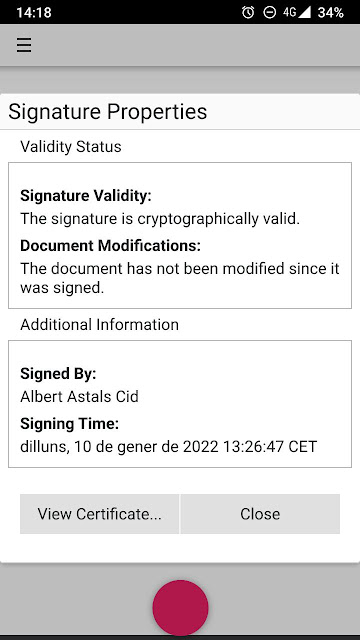
Signature Properties User Interface

If you want you can download the Okular APK from https://binary-factory.kde.org/job/Okular_Nightly_android-arm64/ but beware there are still some limitations that don't make Okular usable day-to-day for Android, so we've created a Google Summer of Code potential project for that, maybe you're interested?

Sunday, March 06, 2022

Looking for Translators!

KDE produces amazing software, but sometimes not everyone can use it.

One of the reasons that can happen is because it's not translated to a language they understand.

For that we are calling for translators, specially for the languages listed below which had not had a single translation update in the last year [*].

Committing to help means that you will do some work every now and then, not just translate a few texts only.

We will help you learn the tools needed and hopefully if you know more people that can help you can grow a team :)

If you're interested please email me at aacid@kde.org

Afrikaans
Armenian
Assamese
Bengali
Bosnian
Breton
Chhattisgarhi
Crimean Tatar
Croatian
Esperanto
Farsi
Frisian
Galician
Georgian
Gujarati
Hausa
Hebrew
Irish Gaelic
Kabyle
Kannada
Kashubian
Kazakh
Khmer
Kinyarwanda
Kurdish
Low Saxon
Luxembourgish
Macedonian
Maithili
Malay
Maltese
Marathi
Nepali
Northern Sotho
Occitan
Oriya
Pashto
Scottish Gaelic
Sinhala
Tatar
Telugu
Thai
Tswana
Uyghur
Uzbek
Walloon
Welsh
Xhosa

[*] apologies if indeed there were translations and my script failed for some reason

Friday, February 18, 2022

Okular: Signature verification User Interface added to Okular mobile interface

Okular has two user interfaces, you can control which one you get when compiling okular by setting the OKULAR_UI cmake variable to desktop (the default) or to mobile (which you can build just fine on the desktop too, there's nothing "mobile only" in it).


The mobile one is built on top of Kirigami and is more oriented to use with touch screens. It also has fewer features, for example, you can't add annotations nor fill forms. I could say it's less likely you need those features on a mobile form factor but that's less and less true as time goes and computing shifts to mobile devices, but that's a story for another day.


One of the features that was missing until today is the user interface parts related to Digital Signature verification, that is, those parts that say if a PDF is signed, if the signature is valid, let you see the certificate, etc.


Now the same as with the desktop version, you get 

the "This document is signed" (and it's variations) banner


The Signature tree on the sidebar/drawer


The Signature properties dialog


And the Certificate properties dialog


The last two are not super great looking but there's not much more you can do when you have to dump lots of data to the user.

Friday, February 04, 2022

Okular: Signature support now works on Windows

Since a few hours ago the Okular version available in the Microsoft Store for Windows has the same signature support than the Linux/FreeBSD versions.


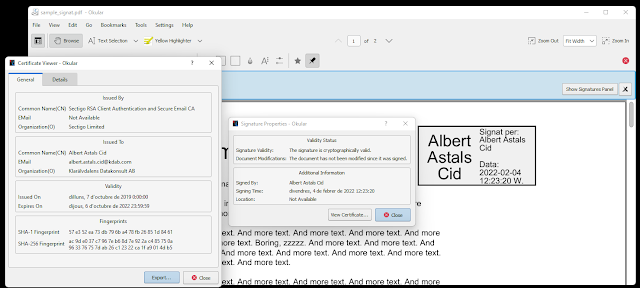
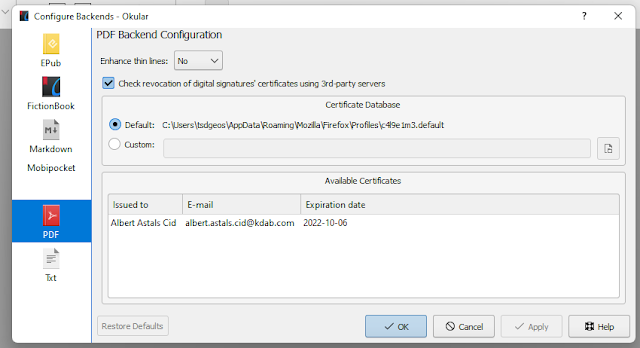
Some screenshots, though it's nothing impressive, it's the same User Interface that we already have had for a while


A file I just signed, showing the Signature and Certificate panels


The PDF backend settings


This "new feature" has been delivered with the update of the just released Okular 21.12.2.

The interesting part is that adding Signature support for Okular on Windows didn't actually require *any* change in Okular itself, its code was already good.


What we needed was to add NSS [1] to Craft [2] and also some tweaks to poppler [3], because sadly NSS doesn't behave exactly the same on Linux than on Windows, and once that was in, just start Okular again and voilĂ  everything was working as expected :)


Relevant Merge Requests:

https://invent.kde.org/packaging/craft-blueprints-kde/-/merge_requests/301

https://invent.kde.org/packaging/craft-blueprints-kde/-/merge_requests/304

https://invent.kde.org/packaging/craft-blueprints-kde/-/merge_requests/305

https://gitlab.freedesktop.org/poppler/poppler/-/merge_requests/1038

https://gitlab.freedesktop.org/poppler/poppler/-/merge_requests/1042

https://gitlab.freedesktop.org/poppler/poppler/-/merge_requests/1044

https://gitlab.freedesktop.org/poppler/poppler/-/merge_requests/1056

https://gitlab.freedesktop.org/poppler/poppler/-/merge_requests/1057

https://gitlab.freedesktop.org/poppler/poppler/-/merge_requests/1059


[1] NSS = the library poppler uses for signature support

[2] Craft = the meta build system we use for building KDE software on Windows

[3] poppler = the library that Okular uses for PDF support

Thursday, January 27, 2022

KDE Gear 22.04 release schedule finalized

It is available at the usual place https://community.kde.org/Schedules/KDE_Gear_22.04_Schedule

 
Dependency freeze is in six weeks (March 10) and Feature Freeze a week after that, make sure you start finishing your stuff!

Monday, January 24, 2022

Okular: Signing of unsigned signature fields has landed

Up to today, Okular would kind of error out when opening a PDF file that contains a signature field that was unsigned (think like the old space in paper forms saying "sign here")


It would tell you "document is signed but can't be properly validated"


And that was it, you couldn't do much with the signature. When you tried to "see" it all the fields would be default like "Signed at 1 Jan 1970", etc.


With the new code we properly detect that there are unsigned signatures and we offer to sign them when interacting with it


Relevant merge requests:

https://invent.kde.org/graphics/okular/-/merge_requests/539

https://gitlab.freedesktop.org/poppler/poppler/-/merge_requests/1026

Wednesday, December 01, 2021

Okular PDF digital signature improvements coming "soon" thanks to NLnet

Starting on January I will be working on a project named "Improve Okular digital signature support" that has received a grant from the NLnet foundation as part of the NGI Assure fund.

This will allow me to work part time on Okular (in case it's not clear I work on Okular on a "when I have time-hobby" basis right now), the planned improvements are:

1. Support for signing unsigned signatures. I know it sounds confusing, think about it like something like the old "sign here" boxes on printed paper forms.

2. Support digital signatures in the Okular Windows version

3. Make signature text support all character sets

4. Write Okular-mobile user interface to show signature status

5. Support digital signatures in the Okular Android version


But I'm hoping to squeeze some other signature related improvements in, if you have a particular favourite please leave a comment.


Thanks to NLnet for trusting me on this, and also thanks to my current employer (KDAB) for allowing me to work less hours for a few months so I can take on this project.

Monday, November 08, 2021

KDE Gear 21.12 releases branches created

Please make sure you commit anything you want to end up in the 21.12
releases to them.

We're already past the dependency freeze, so no new dependencies or
increasing of dependency versions in the stable branches.

The feature freeze, tagging and release of the beta (21.11.80) is in four
days,11 November.

Next interesting dates:
  November 25: 21.12 RC (21.11.90) Tagging and Release
  December  2: 21.12 Tagging
  December  9: 21.12 Release

Complete Schedule:
https://community.kde.org/Schedules/KDE_Gear_21.12_Schedule

Thursday, October 07, 2021

KDE Gear 21.12 releases schedule finalized

 It is available at the usual place https://community.kde.org/Schedules/KDE_Gear_21.12_Schedule

 
Dependency freeze is in four weeks (November 4) and Feature Freeze a week after that, make sure you start finishing your stuff!

Saturday, September 18, 2021

PSA: Don't insult or physically threaten people to try to convince them you are right

Sadly I have had to disable comments in my previous blog because there is a being [that probably passes by human if you look at them] that started with insults, continued with more insults and then graduated to physically threaten me.


I always thought it was obvious, but if you insult people or try to cause them phisical harm, they are usually less prone to think "oh you're right, you've convinced me" and more prone to think "this human needs to stop harassing me and sort out their problems".

Friday, September 17, 2021

American English speakers: Kiev or Kyiv ?

A while ago there was a merge request created for KGeography asking to change Kiev to Kyiv saying "this is the official transliteration of the name for the city".

But that's not what the default text in KGeography shows, the default text in KGeography not the official names of places, the default text in KGeography is the American English translation of KGeography, that's why it says Poland and not Polska.

So question for you American English speakers, if you wanted to write the name of the capital of Ukraine, would you write Kiev or Kyiv?

Edit: comments blocked because there's an body without brain that can't behave in the internet.

Friday, August 27, 2021

Poppler 21.09 will have a massive speed increase for PDF files that use lots of save/restore PDF commands

Take the file from poppler issue 1126. It's a file that doesn't look super complicated, a map of some caves.


With Poppler 21.08 it took 46 seconds to render in my relatively powerful i9-8950HK


Thanks to a patch from Thomas Freitag that time got reduced to 28 seconds by not recalculating again something we had already calculated and just copying it. Huge improvement! [This patch was developed prior to the filing of issue 1126, i guess Thomas had found similar issues on his own]


Then issue 1126 was created yesterday and it was clear that we were still super slow, mupdf/gs/firefox/chromium can render the file almost instantly, and we were at 28 seconds :/


So i had a look at the code and thought, why are we even copying the data if that data never changes? So I made a patch that brought rendering time down to 2.8 seconds :)


And then i had another look at the code and realized we were copying some more data that was never even used


After patching that we're standing at 1.5 seconds

The 3 combined patches have reduced the rendering time by more than 95%


P.S: This only applies to the Splash backend (used by Okular), the Cairo backend (used by Evince) is at 120 seconds, so someone should have a look because probably similar improvements can be made.


Saturday, July 10, 2021

KDE Gear 21.08 releases branches created

Make sure you commit anything you want to end up in the 21.08 releases to them

We're already past the dependency freeze.

The Feature Freeze and Beta is this Thursday 15 of July.

More interesting dates:
  • July 29: 21.08 RC (21.07.90) Tagging and Release
  • August  5: 21.08 Tagging
  • August 12: 21.08 Release

https://community.kde.org/Schedules/release_service/21.08_Release_Schedule

Monday, June 28, 2021

Everything we release in KDE Gear is maintained

During Akademy some members of the community said stuff like "app/library XXX and YYY are not maintained even if we ship them in KDE Gear".


Which is not true, everything released in KDE Gear is maintained, there may not be an explicit maintainer, but there is shared community maintenance.


When confronting a particular person about it, they said "but look, there has not been any new commit that isn't either translation improvements or adapting to code deprecations/etc.", to which i said, "yes, that is exactly what maintenance means".


Road maintenance doesn't mean adding more lanes to the road every month, just means making sure the road does not break and fixing it a bit when/if it happens.


The same applies to software maintenance, the fact that there are no new features does not mean the software is not maintained.


Now, it is true that with community maintenance it's possible that the greater we has missed that something has stopped working, in that case, please raise it up, and we'll evaluate whether it's fixable or if indeed we want to declare that particular bit of software as unmaintained and stop shipping it in KDE Gear.

Wednesday, June 09, 2021

KDE Gear 21.08 releases schedule finalized

It is available at the usual place https://community.kde.org/Schedules/KDE_Gear_21.08_Schedule

 
Dependency freeze is in four weeks (July 8) and Feature Freeze a week after that, make sure you start finishing your stuff!

Monday, May 31, 2021

How i ended up fixing a "not a bug" in Qt Quick that made apostrophes not being rendered while reviewing an Okular patch

But in Okular we don't use Qt Quick you'll say!


Well, we actually use Qt Quick in the mobile interface of Okular, but you're right, this was not a patch for the mobile version, so "But in Okular we don't use Qt Quick!"


The story goes like this.

I was reviewing https://invent.kde.org/graphics/okular/-/merge_requests/431 and was not super convinced of the look and feel of it, so Nate gave some examples and one example was "the sidebar in Elisa".


So I started Elisa and saw this

You probably don't speak Catalan so don't see that lesquerra is a mistake it should be l'esquerra


Oh the translators made a mistake i thought, so i went to the .po file https://websvn.kde.org/trunk/l10n-kf5/ca/messages/elisa/elisa.po?view=markup#l638 and oh surprise! the translators had not made a mistake (well not really a surprise since they're really good).


Ok, so what's wrong then?


I had a look at the .qml code https://invent.kde.org/multimedia/elisa/-/blob/release/21.04/src/qml/MediaPlayListView.qml#L333 and it really looked simple enough.


I had never seen a Kirigami.PlaceholderMessage before but looking at it, well the text ended up in a Kirigami.Heading and then in a QtQuick Label. Nothing really special.


Weeeeeeird.


Ok i said, let's replace the the whole xi18nc in there with the translated text and run elisa. And then i could see the ' properly.


Hmmmm, ok then the problem had to be xi18nc right? Well it was and it was not.


The problem is that xi18nc translates ' to ' to be more "html compliant" https://invent.kde.org/frameworks/ki18n/-/blob/master/src/kuitmarkup.cpp#L40


And unfortunately Qt Declarative 5.15 Text item default "html support" is something Qt calls "Styled Text" that only supports five HTML entities, and apos is not one of them https://code.qt.io/cgit/qt/qtdeclarative.git/tree/src/quick/util/qquickstyledtext.cpp?h=5.15.2#n558


So where is the bug?


The Text documentation clearly states that ' is in the list of supported entities.

One could say the bug is that every time we use xi18nc in a Text we should remember to change the "html support" to something Qt calls "RichText" that actually supports '.


But we all know that's never going to happen :D, and in this case it would actually be hard since Kirigami.PlaceholderMessage doesn't even expose the format property of the inner text

So I convinced our friends at Qt that only supporting five entities is not great and now we support six ^_^ in Qt 6.2, 6.1 and 5.15 (if you use the KDE Qt patch collection) https://invent.kde.org/qt/qt/qtdeclarative/-/merge_requests/3/diffs


P.S: I have a patch in the works to support all HTML entities in StyledText but somehow it's breaking the tests, so well, need to work more on it :)

Monday, April 19, 2021

KDE Gear 21.04 is coming this week! But what is KDE Gear?

Let's dig a bit in our history.


In the "good old days" (TM) there was KDE, life was simple, everything we did was KDE and everything we released was KDE [*]


Then at some point we realized we wanted to release some stuff with different frequency, so KDE Extragear[**] was born.


Then we said "KDE is the community" so we couldn't release KDE anymore, thus we said "ok, the thing we release with all the stuff that releases at the same time will be KDE Software Compilation", which i think we all agree it was not an awesome name, but "names are hard" (TM) (this whole blog is about that :D)


We went on like that for a while, but then we realized we wanted different schedules for the things that were inside the KDE Software Compilation. 


We thought it made sense for the core libraries to be released monthly and the Plasma team also wanted to have it's own release schedule (has been tweaked over the years).


That meant that "KDE Frameworks" and "Plasma" (of KDE Plasma) names as things we release were born (Plasma was already a name used before, so that one was easy). The problem was that we had to find a name for "KDE Software Compilation" minus "KDE Frameworks" minus "Plasma".


One option would have been to keep calling it "KDE Software Compilation", but we thought it would be confusing to keep the name but make it contain lots of less things so we used the un-imaginative name (which as far as i remember i proposed) "KDE Applications"


And we released "KDE Applications" for a long time, but you know what, "KDE Applications" is not a good name either. First reason "KDE Applications" was not only applications, it also contained libraries, but that's ok, no one would have really cared if that was the only problem. The important issue was that if you call something "KDE Applications" you make it seem like these are all the applications KDE releases, but no, that's not the truth, remember our old friend KDE Extragear independently released applications?


So we sat down in the Akademy 2019 in Milan and tried to find a better name. And we couldn't. So we all said let's go with the "there's no spoon" route, you don't need a name if you don't have a thing. We basically de-branded the whole thing. The logic was that after all it's just a bunch of applications that are released at the same time because it makes things super easy from a release engineering point of view, but Okular doesn't "have anything to do" with Dolphin nor with krdc nor with kpat, they just happen to be released at the good time.


So we kept the release engineering side under the boring and non-capitalized name of "release service" and we patted ourselves on the back for having solved a decade long problem.


Narrator voice: "they didn't solve the problem"


After a few releases it became clear that our promotion people were having some trouble writing announcements, because "Dolphin, Okular, Krdc, kpat .. 100 app names.. is released" doesn't really sell very well.


Since promotion is important we sat down again and did some more thinking, ok we need a name, but it can't be a name that is "too specific" about applications because otherwise it will have the problem of "KDE Applications". So it had to be a bit generic, at some point, i jokingly suggested "KDE Gear", tied with our logo and with our old friend that would we have almost killed by now "KDE Extragear"


Narrator voice: "they did not realize it was a joke"


And people liked "KDE Gear", so yeah, this week we're releasing KDE Gear 21.04 whose heritage can be traced to "release service 21.04", "KDE Applications 21.04", "KDE Software Compilation 21.04" and "KDE 21.04" [***]


P.S: Lots of these decisions happened long time ago, so my recollection, specially my involvement in the suggestion of the names, may not be as accurate as i think it is.


[*] May not be an accurate depiction, I wasn't around in the "good old days"

[**] A term we've been killing over the last years, because the term "extra" implied to some degree this were not important things, and they are totally important, the only difference is that they are released on their own, so personally i try to use something like "independently released"

[***] it'd be great if you could stop calling the things we release as "KDE", we haven't used that name for  releases of code for more than a decade now

Tuesday, April 13, 2021

Submit your talks now for Akademy 2021!

As you can see in https://akademy.kde.org/2021/cfp the Call for Participation for Akademy 2021 (that will take place online from Friday the 18th to Friday the 25th of June) is already open.


You have until Sunday the 2nd of May 2021 23:59 UTC to submit your proposals but you will make our (talks committee) live much easier if you start sending the proposals *now* and not send them all last minute in 2 weeks ;)


I promise i'll buy you a $preferred_beverage$ for next years Akademy (which we're hoping will happen live) if you send a talk before end of this week (and you send me a mail about it)


Saturday, March 13, 2021

KDE Gear 21.04 releases branches created

 Make sure you commit anything you want to end up in the 21.04 releases to them

We're already past the dependency freeze.

The Feature Freeze and Beta is this Thursday 18 of March.

More interesting dates
   April  8: 21.04 RC (21.03.90) Tagging and Release
   April 15: 21.04 Tagging
   April 22: 21.04 Release

https://community.kde.org/Schedules/KDE_Gear_21.04_Schedule

Wednesday, February 24, 2021

Okular: Should continuous view be an okular setting or a document setting?

In Okular:


Some settings are okular wide, if you change them, they will be changed in all the future okular instances, an easy example is if you change the shortcut for saving from Ctrl+S to Ctrl+Shift+E. 


Some other settings are document specific, for example zoom, if you change the zoom of a document it will only be restored when opening the same document again, but not if you open a different one. There's also a "default zoom value for documents you've never opened before" in the settings.


Some other settings like "Continuous View" are a bit of a mess and are both. "Continuous View" wants to be a global setting (i.e. so that if you hate continuous view you always get a non continous view) but it is also restored to the status it had when you closed the document you're just opening.


That's understandably a bit confusing for users :D


My suggestion for continuous view would be to make it work like Zoom, be purely document specific but also have a default option in the settings dialog for people that hate continous view.


I'm guessing this should cover all our bases?


Opinions? Anything i may have missed?